 polyclaw
Architecture
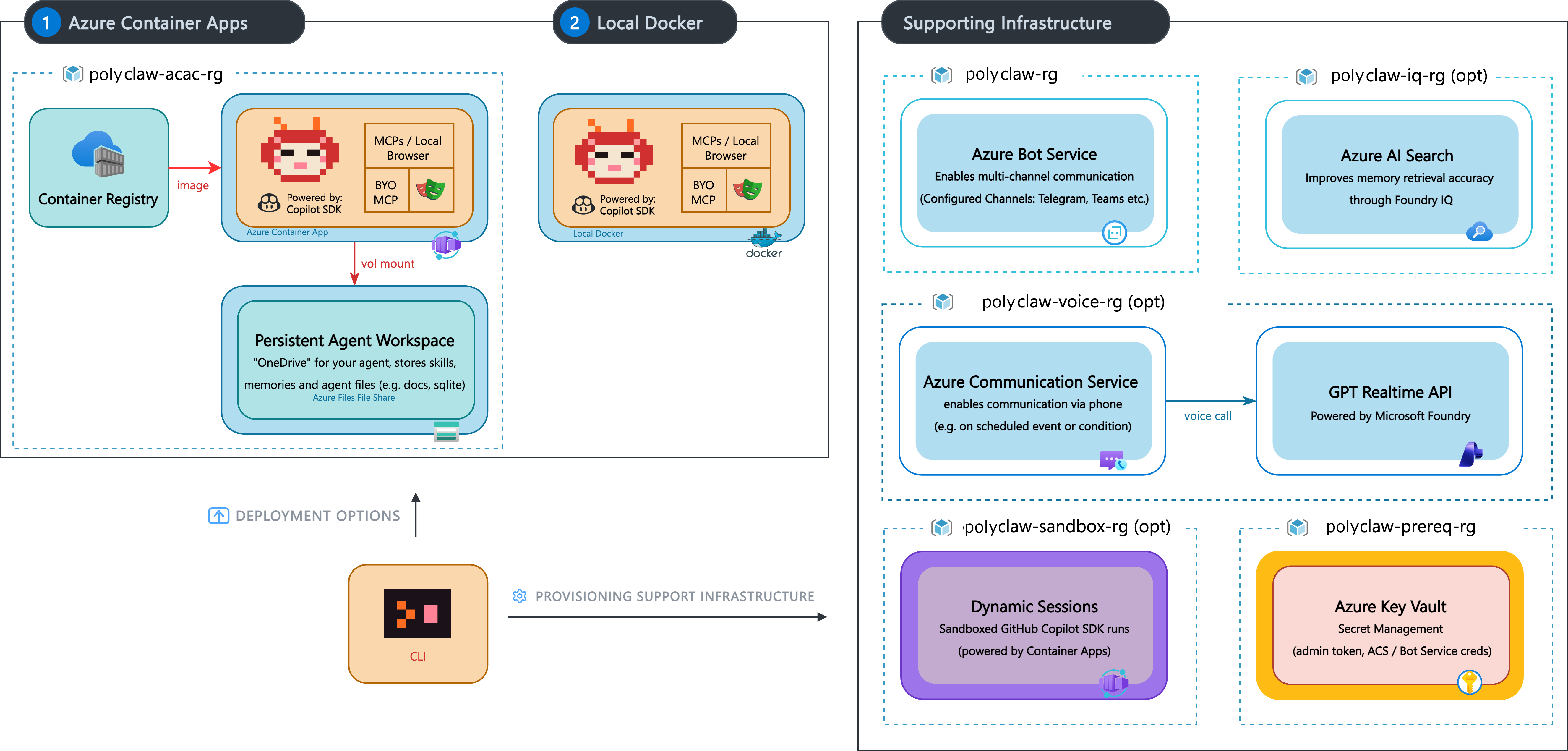
Polyclaw is a monorepo containing a Python backend, a React frontend, and a Node.js terminal UI. The system is designed as a set of loosely coupled layers that communicate through well-defined interfaces.
System Layers
| Layer | Technology | Role |
|---|---|---|
| Agent Core | Python, Copilot SDK, Foundry BYOK | LLM sessions, tool execution, streaming |
| Infrastructure | Bicep, Azure CLI | AI Services, Key Vault, Content Safety provisioning |
| Web Admin | React 19, Vite, TypeScript | SPA dashboard with WebSocket chat |
| Bot Endpoint | aiohttp, Bot Framework SDK | Teams, Telegram, and other channels |
| Voice | Azure Communication Services, OpenAI Realtime | Phone call routing and real-time speech |
| Tunnel | Cloudflare quick-tunnel | Public endpoint exposure |
| Container | Docker multi-stage | Production deployment |
Request Flow
Web Chat
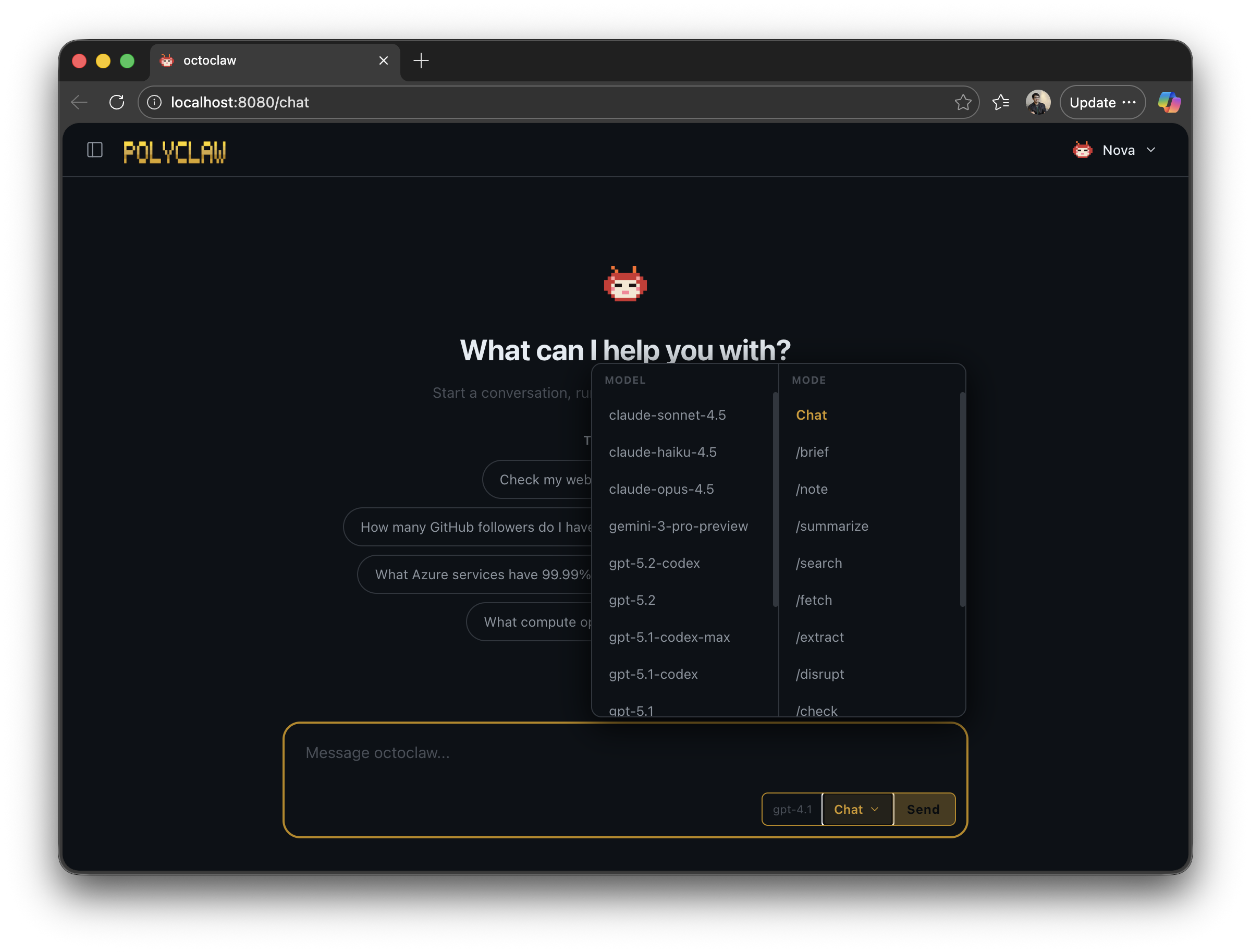
The chat interface lets the user pick a model and a skill mode before sending a message.
- Browser opens a WebSocket to
/api/chat/ws - User sends a message (or slash command)
ChatHandlerroutes toCommandDispatcheror the Agent- Agent creates a Copilot SDK session, streams response deltas
- Deltas are forwarded over WebSocket in real-time
- Tool calls execute and their results are sent as structured messages
- Session is recorded to the session store
Bot Framework
- Azure Bot Service delivers an activity to
POST /api/messages BotEndpointvalidates the request and dispatches toPolyclawBot- The bot sends an immediate typing indicator (to avoid the 15-second timeout)
- Processing runs in a background task via
MessageProcessor - Agent generates a response, which is delivered via proactive messaging
- Rich cards and media attachments are sent through the
CardQueue
Voice Call
POST /api/voice/callinitiates an outbound call via ACS- ACS callback events arrive at
POST /acs - On connect, media streaming starts via WebSocket at
/realtime-acs RealtimeMiddleTierbridges ACS audio to Azure OpenAI Realtime API- Speech-to-text and text-to-speech happen in real-time
Data Flow
All persistent state is stored as JSON files under ~/.polyclaw/ (configurable via POLYCLAW_DATA_DIR):
~/.polyclaw/
  SOUL.md                # Agent personality
  profile.json           # Agent profile and stats
  mcp_servers.json       # MCP server configuration
  scheduler.json         # Scheduled tasks
  proactive.json         # Proactive messaging state
  sessions/              # Chat session archives
  media/                 # Incoming/outgoing files
    incoming/
    outgoing/
    pending/
    sent/
    error/
  memory/                # Memory consolidation
    daily/
    topics/
  skills/                # User and plugin skills
  plugins/               # User-uploaded plugins
Component Diagram
The system is organized into these runtime modules:
agent/– Copilot SDK wrapper, BYOK provider, tools, prompt builderconfig/– Settings singleton, environment loadingmedia/– MIME classification, attachment handlingmessaging/– Bot, cards, commands, proactive deliveryrealtime/– Voice routes, ACS middleware, authregistries/– Plugin and skill registriesserver/– aiohttp app, routes, middleware, chat handlerservices/– Tunnel, deployer, Bicep deployer, Key Vault, Azure CLI wrapperstate/– Session, memory, profile, MCP config, proactive state
Dive deeper: