 polyclaw
Sandbox Execution
Polyclaw can execute code in isolated sandbox environments using Azure Container Apps Dynamic Sessions. Sandbox mode is disabled by default.
How It Works
Polyclaw runs inside its own container and normally has full access to Azure credentials, the local filesystem, and all configured services. When sandbox mode is enabled, the agent’s code-execution tool calls are intercepted and redirected to a remote container session instead of running on the host.
The flow looks like this:
- The agent decides to execute code (shell command, script, etc.)
- On the first tool call, two archives are uploaded to the remote session:
polyclaw_code.zip– the application source code, installed viapip install -e .inside the containeragent_data.zip– whitelisted files from the data directory (only ifsync_datais enabled)
- The code runs inside the remote container via
bootstrap.sh, which unpacks the archives and executes the command - The session stays alive and is reused for subsequent commands. When the session is torn down (idle timeout or explicit termination), results are synced back from the remote container to the local data directory
This means the agent’s commands never execute on the host container directly. The remote session is a throwaway environment with no access to Polyclaw’s own container, its Azure credentials, or any of its infrastructure.
Why This Matters
Because the dynamic session is a separate, sandboxed container:
- Azure auth context is not propagated. The remote session cannot call Azure APIs, access Key Vault secrets, or interact with any Azure resource. This is the primary security benefit – even if the agent generates malicious code, it cannot compromise your Azure environment.
- The agent cannot modify itself. Code runs in an ephemeral container that is destroyed after use, so there is no way for the agent to alter its own configuration, files, or runtime.
The trade-off is that sandboxed execution is less powerful. Any workflow that requires the agent to automate Azure resources (e.g. provisioning infrastructure, querying Azure APIs, managing Key Vault) will not work from within the sandbox. Those operations must happen outside of sandboxed tool calls.
Data Synchronization
- Upload (session start): Whitelisted files and directories from the data directory are zipped as
agent_data.zipand uploaded when the session is first created. The application source is also uploaded aspolyclaw_code.zip. - Download (session teardown): When the session is destroyed (idle timeout or explicit removal),
agent_result.zipis downloaded from the remote container and merged back into the local data directory. Files in the blacklist (.azure,.cache,.config, etc.) are excluded. - Session reuse: The session remains active and is reused for all subsequent tool calls until it idles out (60 seconds of inactivity).
Configuration
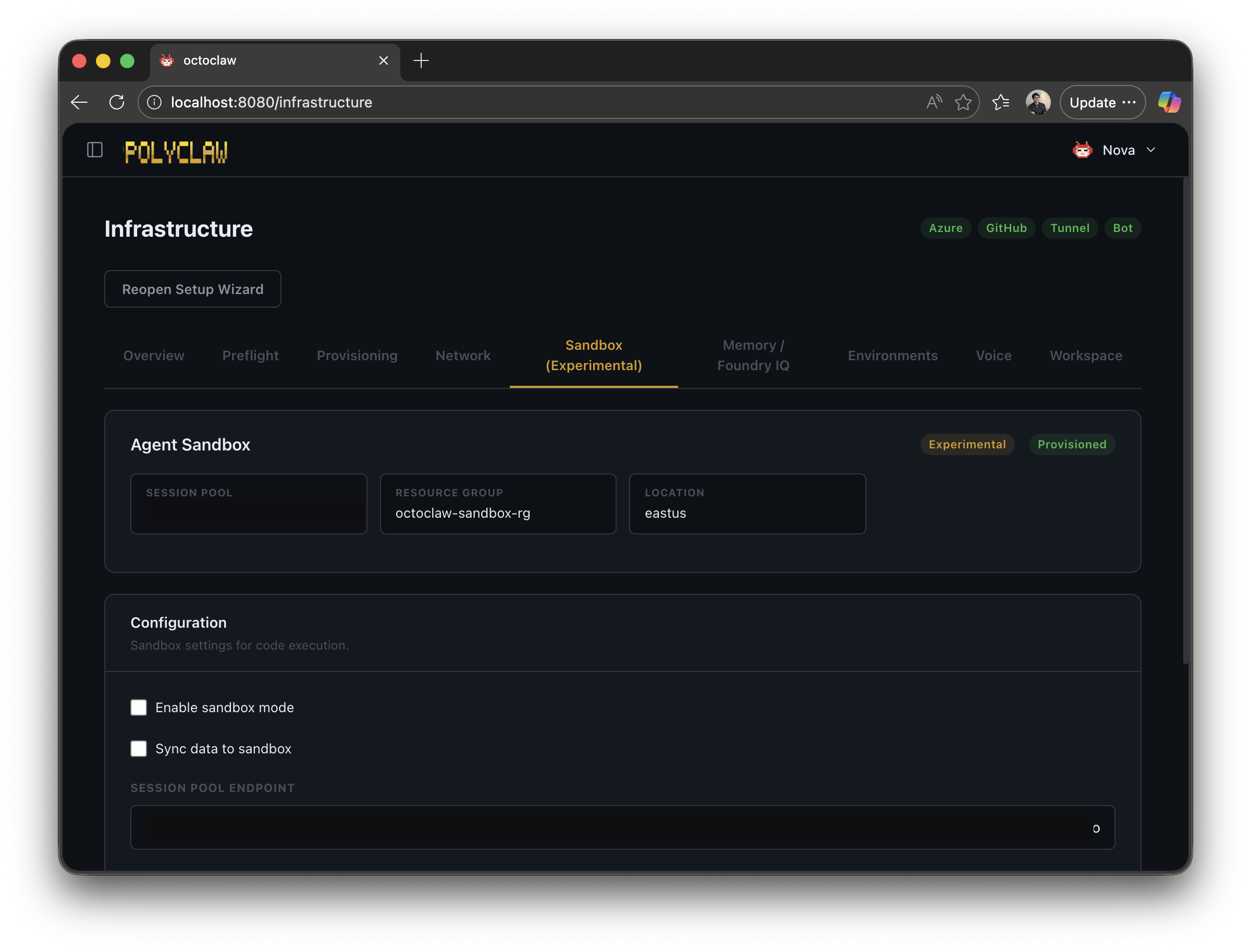
Enable Sandbox
Via the web dashboard Sandbox page or via API:
POST /api/sandbox/config
{
  "enabled": true,
  "session_pool_endpoint": "https://your-pool.eastus.azurecontainerapps.io"
}
The same endpoint also accepts:
| Field | Type | Default | Description |
|---|---|---|---|
enabled | bool | false | Enable or disable sandbox interception |
session_pool_endpoint | string | "" | URL to the Azure Container Apps dynamic sessions pool |
sync_data | bool | true | Upload/download whitelisted data on session create/destroy |
whitelist | list[string] | see below | Files and directories to include in agent_data.zip |
add_whitelist | string | – | Add a single item to the whitelist |
remove_whitelist | string | – | Remove a single item from the whitelist |
reset_whitelist | bool | – | Reset whitelist to the default list |
Default whitelist: media, memory, notes, sessions, skills, .copilot, .env, .workiq.json, agent_profile.json, conversation_refs.json, infra.json, interaction_log.json, mcp_servers.json, plugins.json, scheduler.json, skill_usage.json, SOUL.md
Blacklist (always excluded, cannot be whitelisted): .azure, .cache, .config, .IdentityService, .net, .npm, .pki
Requirements
| Requirement | Description |
|---|---|
| Azure Container Apps | Dynamic sessions pool provisioned |
| Azure credentials | AzureCliCredential or DefaultAzureCredential |
| Pool endpoint | URL to the dynamic sessions pool |
Read Config
GET /api/sandbox/config
Returns the current configuration together with blacklist, default_whitelist, is_provisioned, and experimental: true.
Test the Sandbox
POST /api/sandbox/test
{
  "command": "echo hello",
  "timeout": 60
}
Runs a single command in a fresh session using SandboxExecutor.execute() and returns the result. Useful for verifying the pool endpoint is reachable before enabling sandbox mode for the agent.
Auto-Provisioning
Polyclaw can provision an Azure Container Apps dynamic sessions pool automatically (requires Azure CLI credentials):
POST /api/sandbox/provision
{
  "location": "eastus",
  "resource_group": "my-rg",
  "pool_name": "my-sandbox-pool"
}
All fields are optional. Defaults: location=eastus, resource_group=polyclaw-sandbox-rg, a randomly generated pool_name. If a pool is already provisioned the call is a no-op.
The endpoint:
- Creates the resource group if it does not exist
- Creates a
PythonLTSsession pool with--cooldown-period 300 - Saves the pool endpoint, resource group, location, and pool ID to the sandbox config
To remove the pool:
DELETE /api/sandbox/provision
This deletes the session pool, removes the resource group if it was auto-created (polyclaw-sandbox-rg), disables sandbox mode, and clears all pool metadata from the config.
Benefits
- Security: Code runs in an isolated container, not on the host. Azure auth context is not propagated, protecting your cloud environment.
- Reproducibility: Clean environment for each session (sessions are reused within the idle window, then destroyed)
- Resource isolation: Container resources are completely separate from the server
Session Lifecycle
- Create: A new session is provisioned on the first intercepted tool call.
polyclaw_code.zip(andagent_data.zipifsync_datais enabled) are uploaded, andbootstrap.shruns to install the code. - Reuse: Subsequent tool calls execute inside the same session via
run_in_session. - Idle reaper: A background task checks every 10 seconds. If no activity has occurred for 60 seconds, the session is torn down.
- Data sync at teardown: When the session is destroyed,
agent_result.zipis downloaded from the container and merged into the local data directory (whitelisted files only, blacklist excluded).
Token Acquisition
Authentication to the Dynamic Sessions API uses:
AzureCliCredential(local development)DefaultAzureCredential(production / managed identity)
Limitations
- Sandboxed code cannot access Azure APIs, Key Vault, or any Azure resource (auth context is intentionally not forwarded)
- Workflows that require Azure automation must run outside the sandbox
- File tools are disabled. When sandbox mode is active, the agent’s built-in file-management tools are removed and the agent is instructed to use terminal commands instead (e.g.
cat,sed,mv). This ensures all file operations go through the sandboxed session rather than the host filesystem. - Some MCP servers and plugins may break. Many MCP servers are built to interact with the local filesystem directly. Since sandbox execution redirects all terminal activity to a remote container that has no access to the host’s files or services, MCP tools that depend on the local environment will fail. This is an inherent trade-off of sandboxing.
- Latency impact: Session creation adds significant latency on the first tool call (provisioning, uploading code and data archives, running bootstrap). Subsequent tool calls within the same session are much faster since the session is already warm.
- Last-writer-wins on teardown: If multiple sessions run concurrently and both sync data back, the last one to close wins. Avoid parallel sessions that write to the same files.
- Not yet validated in multi-replica Container Apps deployments