 polyclaw
Realtime Voice / Phone Calls
Polyclaw can place and receive real phone calls. During a call, a dedicated voice AI persona handles the conversation in real time while delegating tasks back to the main agent – browsing the web, searching memory, running code, or anything else the text agent can do.
The stack is Azure Communication Services (ACS) for telephony and the Azure OpenAI Realtime API for speech.
Voice as a Tool
Placing a call is just another tool in the agent’s toolbox, no different from searching the web or writing a file. This means any workflow that can trigger a tool call can also trigger a phone call:
- Ad-hoc: send a text message like “please call me” and the agent places the call.
- Scheduled: create a recurring task that checks an external condition (a deploy pipeline, a stock price, a support queue) and calls you when a threshold is met.
- Proactive: combine with proactive messaging so the agent notices something on its own and phones you to discuss it.
Once the call connects, the voice AI is not a dead end – it can delegate back to the full agent mid-conversation through function calls. If the caller asks a question that requires a web search, code execution, or memory lookup, the voice model hands it off, waits for the result, and relays it conversationally. This makes voice a powerful human-in-the-loop channel: the agent can escalate to a real conversation when text is not enough, gather live input from you, and feed it back into whatever workflow triggered the call.
How It Works
The agent exposes a make_voice_call tool. It calls you on the phone number you configured in VOICE_TARGET_NUMBER. The tool takes two optional parameters:
prompt– instructions the voice AI should follow during the call (the subject, questions to ask, tone, etc.).opening_message– the first thing the voice AI says when the call connects.
When the call is placed, ACS streams audio over a WebSocket to a RealtimeMiddleTier bridge that forwards it to the Azure OpenAI Realtime API. The voice AI speaks and listens in real time, and can invoke the main agent through three internal tools (invoke_agent, invoke_agent_async, check_agent_task) to look things up, perform actions, or answer factual questions mid-call.
Incoming calls work the same way – ACS delivers the call, the bridge answers it, and the voice AI handles the conversation.
Target Number
The agent can only call a single pre-configured number stored in VOICE_TARGET_NUMBER. Set it with the /phone command or through the web dashboard voice setup. If no target is configured the tool returns an error.
Voice Persona
The voice session uses a separate system prompt optimized for spoken conversation. The voice AI identifies itself as polyclaw, never reveals that it is a separate model or layer, and speaks naturally. When the caller asks a question or requests a task, the voice AI delegates to the main agent behind the scenes and relays the result conversationally.
Configuration
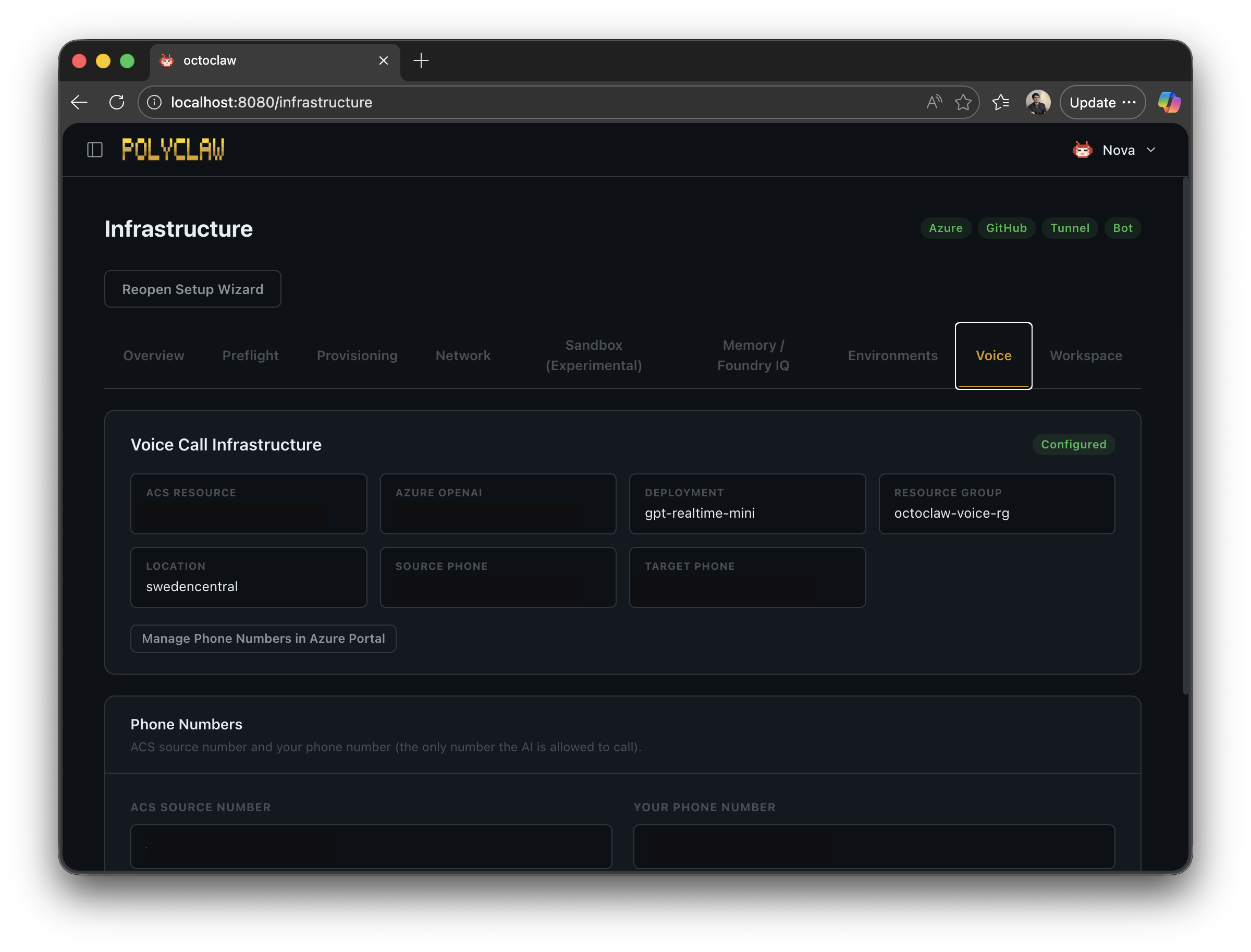
Voice is provisioned through the TUI or web dashboard. The required resources are:
- An Azure Communication Services resource with a purchased phone number (the caller ID).
- An Azure OpenAI resource with a Realtime model deployment (e.g.
gpt-realtime-mini, configured viaAZURE_OPENAI_REALTIME_DEPLOYMENT). - Network connectivity between ACS and the polyclaw server (via tunnel or public endpoint).
Security
ACS callback requests go through two authentication layers:
- Query-param token – a shared secret appended to every callback URL. Requests without the correct token are rejected immediately.
- RS256 JWT – when a
Bearertoken is present, the signature is verified against Microsoft’s hosted JWKS (https://acscallautomation.communication.azure.com/calling/keys). The JWT audience (the ACS resource ID) is auto-learned from the first signature-verified request so no manual configuration is required.
The agent’s voice tool calls the internal API over localhost with Bearer auth, so even if the raw endpoint accepts an arbitrary number, the LLM tool schema does not expose one – the agent can only dial the pre-configured target.